Client

Your MSP clients deserve a
technology business review
every month
TBR by Inputiv gives you a single platform to track Microsoft 365 security posture, license usage, user management, and compliance — then generate beautiful client-ready reports in one click.
.svg)
.svg)
.svg)
.svg)
.svg)
.svg)
.svg)
.svg)
why tbr
Everything your MSP needs to run client reviews
Most MSPs do quarterly or annual business reviews — if at all. TBR makes it effortless to run them monthly, with real data from your clients' Microsoft 365 tenants and your existing tools.
Give your clients a proper window into their security posture, license efficiency, and user health. Build trust, justify renewals, and spot upsell opportunities — all from one dashboard.

One-click client reports

Multi-client management
Manage all your client organisations from a single dashboard. Track status, domains, and activity across your entire portfolio.

Microsoft 365 security posture
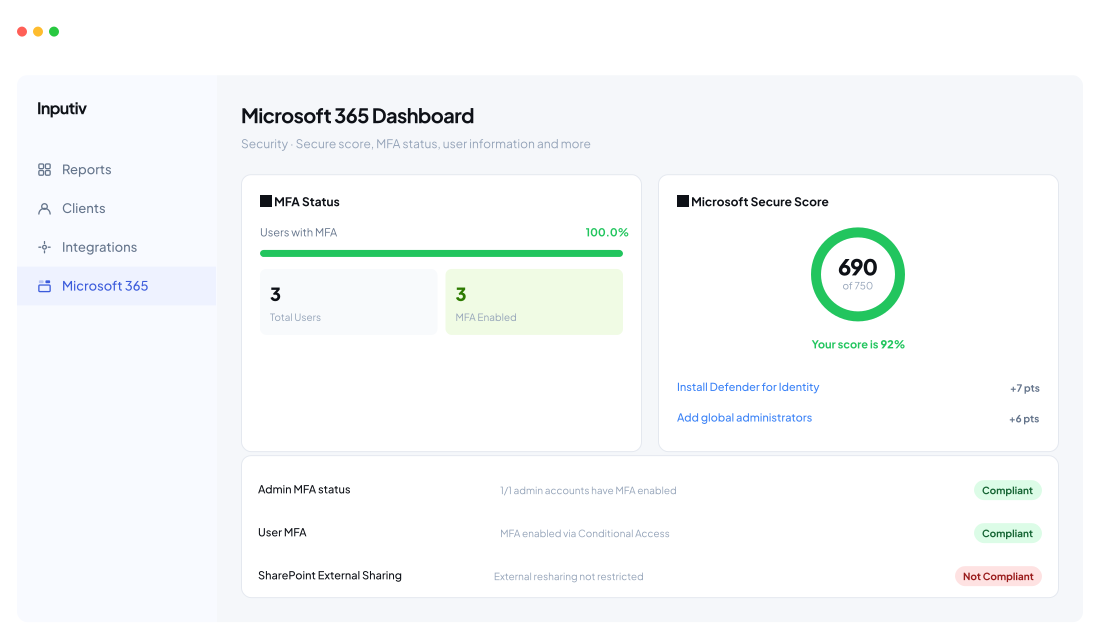
Live Secure Score, MFA compliance status, license utilisation, and user management — all pulled direct from M365.

Deep tool integrations
Connect Autotask, NinjaOne, Bitdefender, SentinelOne, and more to enrich your TBR data with your full MSP stack.
.svg)
Platform Modules
Four modules.
One complete picture.
Every module is built specifically for the data MSPs need when sitting down with a client — not generic dashboards, but MSP-native insights.
Microsoft 365 Dashboard
Pull live data directly from your clients' Microsoft 365 tenants. Monitor security posture, track license efficiency, and view every user's status — all without leaving TBR.
Security Tab
Live Microsoft Secure Score (out of 750), MFA status for all users, compliance checks with recommendations, and one-click remediation links for non-compliant policies.

Licenses Tab
License overview with total users, distribution between Standard and Premium tiers, detailed table showing
assigned vs available seats and utilisation percentage.

Users Tab
Complete user directory with name, email, department, role, user type, and active status. Spot admin accounts, inactive users, and onboarding gaps instantly.

Security Compliance Checks
Live Data
690
/750
Secure Score

92%
Compliance
100%
MFA Coverage
Check
Details
Status
Admin MFA
1/1 admin accounts have MFA enabled. No action required.
Compliant
User MFA
MFA enabled for all 450 users via Conditional Access.
Compliant
SharePoint Sharing
Disable external user resharing to prevent data sprawl.
Not Compliant
Unified Audit Logs
Auditing enabled and actively logging events.
Compliant
Monthly Client Reports
Generate a complete, professional Technology Business Review report for any client in seconds. Select the organisation, pick the month, and download — ready to present or email.

One-Click PDF Generation
Select an organisation and reporting month — TBR automatically pulls all live data and compiles it into a clean, branded PDF report. No manual work, no copy-pasting from dashboards.
What's Inside Each Report
Microsoft Secure Score, MFA coverage, license utilisation, open compliance issues, active user count, and top improvement recommendations — all on one page, structured for a non-technical business owner.

Historical Report Archive
Access any past month's report instantly. Track how your client's security posture and license efficiency has improved over time — powerful for quarterly and annual business reviews.

Ready to Present or Send
Reports are formatted for both in-person presentation and email delivery. Download as PDF and share directly — no additional formatting required on your end.
📋 Generate Report
Ready
Thank you! Your submission has been received!
Oops! Something went wrong while submitting the form.
Report Preview — Quantum Engineering · March 2026
🔒 Top Recommendation
Restrict SharePoint external sharing
👥 Active Users
3 users
All active
⚠️ Compliance Issues
1 open
Action needed
📋 License Utilisation
12 / 20 seats
60%
🔒 MFA Coverage
3 / 3 users
100%
🛡️ Microsoft Secure Score
690 / 750
92%
Report generated · March 31, 2026
Client Management
Manage all your client organisations from a single centralised dashboard. Add, edit, and monitor every client — with domain tracking, sync status, and a direct line to their Microsoft 365 data.
Centralised Client Registry
One place to manage every client organisation. No more spreadsheets or scattered documentation — TBR is your single source of truth for client name, domain, status, and last sync timestamp.

Domain Tracking & Sync Status
Track each client's primary domain, visit their website directly, and see exactly when their Microsoft 365 data was last refreshed — so your reports are always current and accurate.
Per-Client M365 Snapshot
See each client's live Secure Score, MFA coverage percentage, and license utilisation at a glance from the client list — without drilling into each individual dashboard.

Unlimited Client Organisations
Add as many client organisations as your MSP manages. TBR scales with your business — no per-client pricing, no seat limits on the number of organisations you can monitor.
🏢 Client Management
3 Active
Domain
Status
C
Crimson Retail
crimsonretail.shop
Active
G
Global Finance Corp
gfc.finance
Active
Q
Quantum Engineering
quantumeng.io
Active
Updated 3/27/2026
Security Posture Tracking
Go beyond a point-in-time snapshot. TBR tracks your clients' security posture over time — so you can show measurable improvement, catch regressions early, and walk into every business review with a clear before-and-after story.

Secure Score Trend
See how each client's Microsoft Secure Score has moved month-over-month. Spot improvements from work you've done, and catch any drops before they become a problem conversation.
.png)
Prioritised Improvement Actions
Microsoft ranks every improvement action by point value and impact. TBR surfaces the top actions for each client — so you always know exactly what to fix next to move the score.
License & Seat Health
Track licence utilisation alongside security — unassigned seats and overprovisioned licences show up as cost and compliance risks. Spot them before your client's renewal and turn it into an upsell conversation.

Open Issues Register
Every non-compliant policy stays logged until it's resolved. Track when issues were first detected, how long they've been open, and the remediation recommendation — all visible in your monthly report.
📈 Security Posture — Quantum Engineering
Live
Secure Score — 6 Month Trend
420

Oct
490

Nov
530

Dec
580

Jan
640

Feb
690

Mar
+270 pts over 6 months
↑ 64% improvement
Top Improvement Actions
Install Microsoft Defender for Identity
High Impact
Identity
+7 pts
Add additional global administrators
High Impact
Identity
+6 pts
Restrict SharePoint external sharing
Medium
Apps
+4 pts
Licence & Seat Health
M365 Business Premium

12/20
60%
⚠️ 8 unassigned licences detected
Potential saving: ~$200/mo. Review and reassign or downgrade.
From setup to client
report in minutes.
TBR is designed to be operational on day one. No complex onboarding, no weeks of setup — just connect, configure, and start impressing your clients.
integrations
Works with the tools your
MSP already uses
TBR connects to your existing stack — no ripping and replacing. Every integration adds richer data to your client reports.
.svg)
Autotask PSA
Integrate with Autotask PSA for services automation, ticketing, and client management data — surfaced directly in your TBR reports.
PSA

NodeWare
Scans client networks for vulnerabilities, unpatched devices, and open risks — tells MSPs exactly what to fix before attackers exploit it.
Network

SentinelOne
Monitor every endpoint 24/7, block malware and ransomware attacks, and auto-respond to threats across client devices from a single MSP console.
Security
%201.svg)
N-able Cove Data Protection
Cloud-first backup and recovery for servers, workstations, and Microsoft 365 — with secure, automated protection and quick restores.
Backup

Bitdefender
Advanced endpoint protection, real-time threat detection, malware prevention, and automated security response across managed devices.
Security

ConnectSecure
Perform vulnerability scanning, pull security risk scores,and include risk assessment results in your monthly Technology Business Reviews.
Security
.svg)
NinjaOne RMM
Connect with NinjaOne RMM for automated endpoint monitoring, patch management status, and remote support data enriching your reports.
RMM

More coming soon
We're actively adding integrations based on MSP feedback. Have a tool you need? Let us know and we'll prioritise it.
Request integration
Inputiv
Expert helpdesk & project support for MSPs across the US and Australia. SOC 2 Type 2 certified.

SOC 2 Type 2
✓
Security · Confidentiality · Availibility
Certified · Accorp Partners CPA LLC · Oct 2025